

How to Make Your FAQs Appear in Google and AI Responses
Frequently Asked Questions (FAQs) are no longer just helpful to users – they can be a powerful way to boost your visibility in Google search results and AI-driven summaries. By implementing structured data correctly, your FAQs can appear directly in search results, providing concise answers to your users and enhancing your SEO. In this guide, we’ll break down the technical steps, schema markup, and best practices to ensure your FAQ content performs at its peak.
Why FAQ Pages Matter for SEO and AI Responses
Search engines, including Google, now prioritize structured content that directly answers users questions. Properly marked-up FAQs can:
- Appear as rich snippets in Google Search, increasing click-through rates (CTR).
- Be understood by AI systems that generate summaries or answer boxes.
- Reduce customer support workload by providing clear, accessible answers.
- Expand your site’s SERP real estate.
Google explicitly recommends using the FAQPage schema for content that answers common questions:
Step 1: Structure Your FAQs Correctly
Before adding schema, ensure your FAQ content is:
- Clear and concise.
- Each question and answer is self-contained.
- Organized in a logical order or category (optional but recommended).
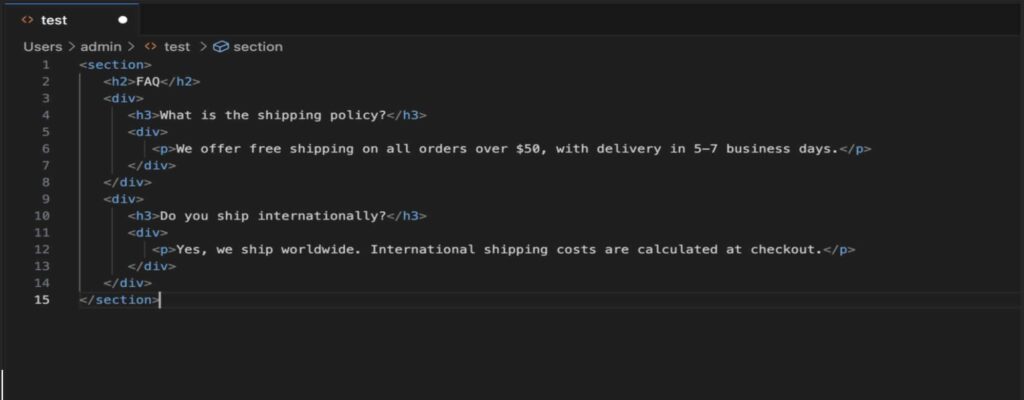
Example HTML structure without schema:
Step 2: Add FAQPage Schema Using HTML Microdata
Schema markup tells search engines what your content represents, making it eligible for rich snippets.
Microdata version:
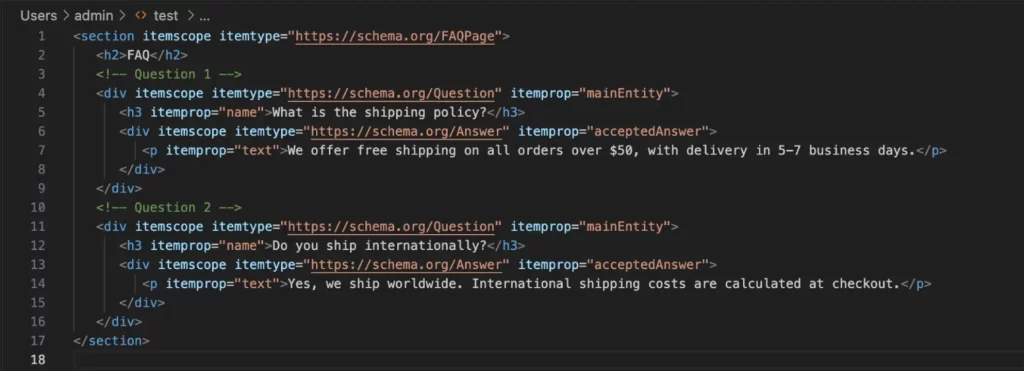
Key attributes to note:
| Attribute | Purpose |
|---|---|
| itemscope | Defines a new schema entity |
| itemtype | Indicates the type (FAQPage, Question, Answer) |
| itemprop="mainEntity" | Marks the question itself |
| itemprop="name" | Question text |
| itemprop="acceptedAnswer" | Answer entity |
| itemprop="text" | Answer content |
Step 3: Add FAQPage Schema Using JSON-LD (Alternative)
JSON-LD is preferred by many developers because it’s easier to maintain and doesn’t mix with HTML markup.
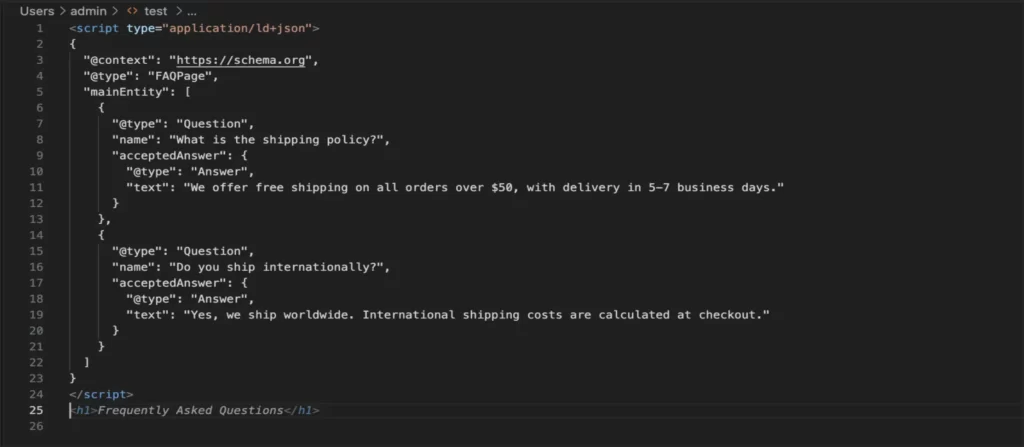
Why JSON-LD?
- Easier to update without touching HTML
- Less likely to break your layout
- Fully supported by Google for FAQ rich snippets
Step 4: Validate Your FAQ Schema
Validation is critical to ensure your structured data is eligible for rich results.
- Open Google Rich Results Test
- Paste your URL or code snippet
- Check for errors or warnings
- Preview how your FAQ may appear in search results
Always fix errors before publishing to avoid penalties or missing rich snippets.
Step 5: Optimize FAQ Content for SEO and AI Responses
Even if schema is correct, Google and AI systems will rank your FAQs based on content quality and relevance.
Tips for Optimization:
1.Answer questions concisely:
- First sentence should answer the query directly.
- Additional lines can clarify or provide details.
2.Use natural language:
- Match the way people search (e.g., “How do I track my order?”).
3.Include internal links:
- Link to relevant product pages, guides, or policies.
4.Organize FAQs by category:
- Improves crawlability and user navigation.
5.Add multimedia if needed:
- Short videos or images can enhance answers and user engagement.
6.Regularly update FAQs:
- Add new questions, revise outdated answers, and monitor Google Search Console metrics.
Step 6: Enhance AI Response Visibility
To get your FAQs included in AI summaries or chat responses:
- Write clear, unambiguous answers.
- Avoid jargon unless necessary.
- Use structured headings (H2/H3) for each question.
- Keep answers self-contained; AI prefers complete responses without external context.
- Link to long-form resources for deeper context (helps AI generate accurate summaries).
Step 7: Common Mistakes to Avoid
- Copying user-generated content or spammy text
- Using FAQ schema for ads/promotions
- Creating overly long or confusing answers
- Forgetting to update FAQs when policies change
- Not testing schema in Rich Results Test
Google explicitly warns against these practices in their FAQPage guidelines.
Step 8: Bonus - Example FAQ Implementation for WordPress
If you’re using WordPress, consider:
1. Block editor: Use a “FAQ” block with schema support.
2. Plugins:
- Yoast SEO Premium – auto-adds FAQ schema to FAQ blocks.
- Rank Math – supports JSON-LD FAQ and HowTo schema.
- Schema & Structured Data for WP – advanced schema types.
Implementation example in WordPress block:

This ensures both Google and AI systems can read your FAQs.
By combining:
- Well-structured FAQ content
- Correct schema markup (HTML microdata or JSON-LD)
- SEO-friendly writing
- AI-ready formatting
…your FAQs can appear directly in Google search results and AI responses, helping your users find answers faster, boosting your site’s visibility, and reducing support workload.
Next Steps:
- Audit your current FAQ pages.
- Add or update schema markup.
- Validate using Google Rich Results Test.
- Monitor performance in Search Console.
- Refresh content regularly to stay ahead in AI and SERP visibility